
Redefining Prompt Alignment in Text-to-Image Customization
AlignIT: A Breakthrough in Improving Prompt Alignment for Text-to-Image Customization

Introduction
Text-to-image diffusion models have revolutionized creative applications by generating stunning visuals from textual prompts. Yet, customizing these models with user-supplied references often leads to a critical gap: the generated images capture the custom concept but fail to align other elements with the prompt accurately. AlignIT, a novel approach from Adobe Research(Adobe Visionaries) addresses this issue by enhancing alignment without retraining the model.
Why Prompt Alignment Matters
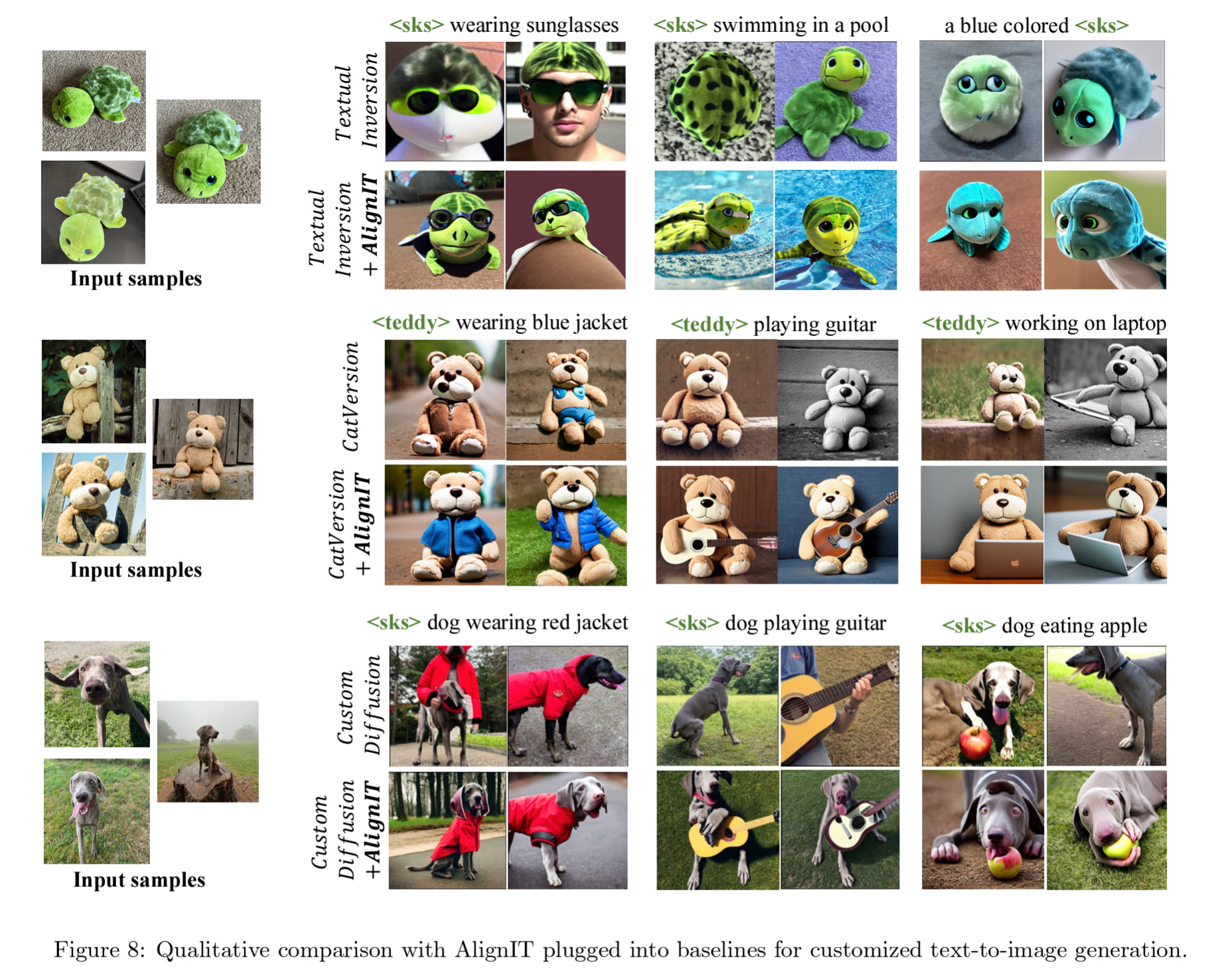
Imagine customizing a model to create a "cat playing badminton" based on reference images. Existing methods, like Textual Inversion or Custom Diffusion, struggle to balance between faithfully representing the custom cat and aligning with scene-specific prompts like "playing with a ball in the garden." This tradeoff, termed the reconstruction-editability challenge, limits usability.
AlignIT: A Seamless Solution
AlignIT builds on the observation that keys and values—core elements of cross-attention in diffusion models—hold semantic control over the generated output. Misalignment stems from the divergence of these keys and values in customized models versus their baseline counterparts. AlignIT solves this by ensuring that only the keys and values representing the custom concept are modified, preserving the alignment for all other prompt elements.
Key features of AlignIT include:
Test-Time Adaptation: AlignIT works at inference time, requiring no retraining of the model.
Plug-and-Play: It integrates seamlessly with existing customization methods, enhancing their performance.
Semantic Control: AlignIT enables fine-grained control over image elements, ensuring prompt fidelity.
Technical Insights
AlignIT leverages a three-stage text encoding process common to diffusion models:
Token Embedding: Custom embeddings represent user-supplied concepts.
Text Encoding: Models like CLIP encode these embeddings into conditioning vectors.
Cross-Attention: Keys and values derived from these vectors influence the final image.
By aligning keys and values at the third stage with baseline values (except for the custom concept), AlignIT ensures precise alignment without compromising customization.
Real-World Applications
The power of AlignIT is evident across diverse scenarios:
Creative Design: From surreal artwork to personalized content, AlignIT ensures fidelity to artistic prompts.
Marketing: Customizing visuals for campaigns becomes effortless and precise.
Education: Interactive visuals tailored to teaching needs can be generated seamlessly.
Experimental Validation
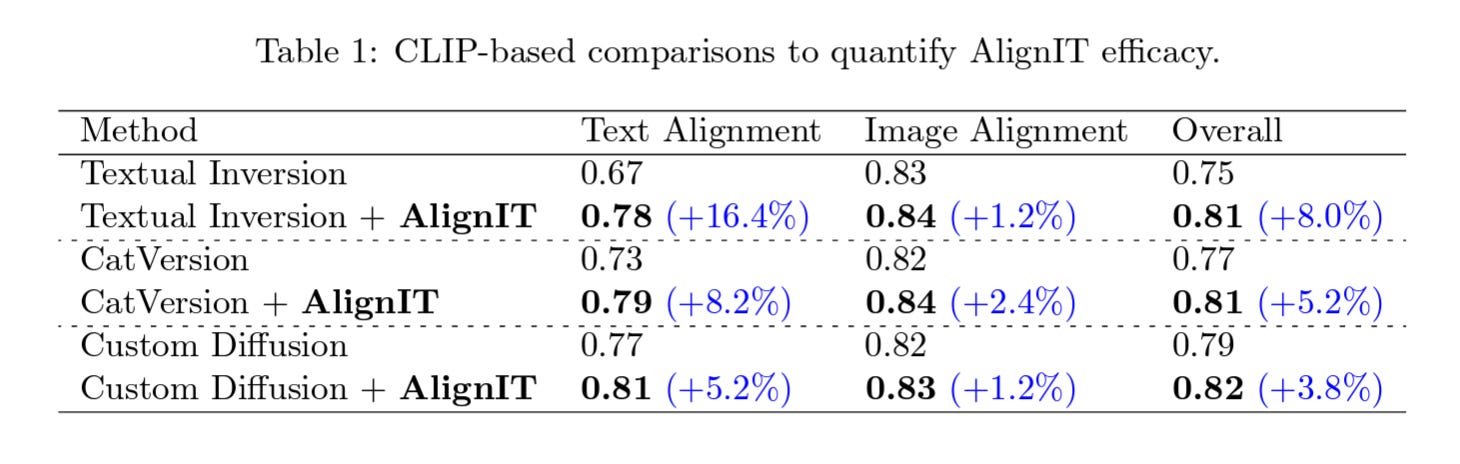
Using the CustomConcept101 dataset, AlignIT showed significant improvements in aligning generated images with prompts while retaining high-quality customization. Visual comparisons highlighted its superiority over existing methods in capturing nuanced scene details.
Conclusion
AlignIT represents a leap forward in bridging the gap between customization and prompt fidelity. For researchers, creatives, and technologists, this method unlocks new dimensions in text-to-image generation, paving the way for more intuitive and powerful tools.